Virtual Drums
A drum kit you play with the keyboard. Sixteen pads, a full online kit, no sticks, no hardware, no install.
Loading the pads…
Play Drums Online, Right Here
Press a key. The kit below runs in this page — no install, no account, nothing to download. The audio engine is WebAssembly in an AudioWorklet, not an HTML audio element, which is the difference between virtual drums you can play and ones that feel a beat behind you. 1 2 3 4 — top row Q W E R — second row A S D F — third row Z X C V — bottom row Space — stop everything On a phone or tablet, just tap. Hold a few keys at once and they layer — kick and ride together is the way most fills land. The layout runs low to high as you go down. Four 808s on the top row, two kicks and two snares on the second, rimshot, clap and the two hi-hats on the third, then open hat, shaker, tom and ride along the bottom.
What This Online Drum Kit Is, and What It Is Not
This is a boom bap kit — dusty, live-sounding drums rather than the clean electronic palette, written at 90 BPM. It is the closest thing here to a kit somebody actually sat behind: two kicks with different weight, two snares with different crack, a rimshot, a tom and a ride. What each pad is for: • Kick Boom / Kick Crunch — the floor of the pattern. Boom carries the weight, Crunch carries the attack. Most grooves use one and drop the other in for emphasis. • Snare Bap / Snare Crack — the backbeat, normally beats 2 and 4. Bap is round and dry, Crack cuts through a busy loop. • Rimshot — the quiet backbeat. Ghost notes and half-time feels live here. • Clap — layer it under a snare for the stadium version. • Hat Closed / Hat Loose — the pulse, eighths or sixteenths. Loose is the slightly-open one, and alternating the two is most of what makes a hat line sound played rather than programmed. • Open Hat — the lift, usually just before the snare. • Perc Tom — fills, and the drop into a new section. • Ride — the other way to keep time. Swap it for the hats and the same pattern turns into something else entirely. • Shaker — the detail that keeps a loop from sounding pasted. • Four 808s — C, G, a high C and a slide. The tuned low end underneath all of it. What it is not is a full acoustic kit: there is one tom rather than a rack of them, and no crash. If you want that, drag your own samples onto the pads — that is covered further down, and nothing about the kit above is fixed.
Why the Keyboard Works Better Than It Sounds
A computer keyboard has no velocity — every key press is the same strike. That is the honest limitation of any virtual drum simulator, and it is smaller than you would expect, because a keyboard has something a drum kit does not: ten fingers over sixteen sounds, with no travel time between them. Rolls that need two hands and a lot of practice on a real kit are two fingers here. Nothing has to move across the kit — the cymbal is one key away from the kick. What you lose is dynamics. Two fixes: put the same sound on two pads at different volumes and alternate between them, or plug in a MIDI pad controller, which is velocity-sensitive and works over USB with no driver.
Make the Hi-Hats Behave Like Real Cymbals
On an acoustic kit, the open and closed hi-hat are the same pair of cymbals — the pedal decides which one you hear, so they physically cannot ring at the same time. Most online drum kits ignore this, and the giveaway is that an open hat keeps washing underneath the closed hats that follow it. It sounds synthetic and you can hear it immediately. Put both hats in the same mute group and the newer trigger cuts the older one, exactly like the pedal does. The same trick works for the two 808s you want trading places rather than stacking, and for two loops that must never overlap.
Playing Along to Something
The usual reason to open a drum simulator is to play along — to a song, a metronome, or a loop you already have. The audio here runs independently of anything else in the browser, so a track playing in another tab keeps going and you drum over it. Latency stays low enough to stay in time; if it drifts, close other heavy tabs, because an AudioWorklet shares the machine with everything else. Playing drums online is one thing; keeping what you played is another. The link under the pads carries the kit into the full beat maker, where the same 16 pads sit above a 16-step sequencer — program a pattern step by step, or play it in and quantise afterwards. Swing, per-step velocity, pattern A/B and WAV export are all on the same screen, and nothing you loaded on the pads is lost on the way over.
Open the full beat makerMake It Your Kit
The default is a boom bap kit because it is the one that plays most like a real kit. It is not fixed: drag any MP3, WAV, FLAC or OGG onto a pad and that pad becomes your sound. A rock kit, a jazz kit, a full acoustic kit with a rack of toms and a crash, a set of vocal chops, or sixteen unrelated sound effects all work the same way. Every pad then has its own pitch (semitones and cents), volume in dB, trim points on the waveform, loop toggle and mute group. Tuning one snare down three semitones and putting it on a second pad gives you a second snare without a second sample, which is how most kits get their fills. Files never leave the browser. There is no upload step and no server involved — the samples are read locally and decoded in the tab.
Frequently Asked Questions
Use the 4×4 grid: 1 2 3 4, Q W E R, A S D F, Z X C V — sixteen keys for sixteen pads. Space stops all sounds. Hold several keys at once to layer hits.
Yes. The kit on this page runs entirely in the browser tab — no install, no plugin, no account. Click a pad or press a key and it plays.
Yes, completely — no account, no trial, no download, no watermark on exports. The kit and the beat maker are the same free tool.
The engine is WebAssembly running in an AudioWorklet, which is the low-latency audio path in the browser. If you do notice lag, close other heavy tabs — audio processing shares the machine with everything else running.
Yes — tap the pads. It works in Chrome and Safari on Android and iOS. The keyboard mapping needs a physical keyboard, so a tablet with a Bluetooth keyboard gives you both. A MIDI controller over USB needs Chrome; Safari does not support Web MIDI on either platform.
Yes. Plug in any USB MIDI controller and it is detected via Web MIDI — notes 36-51, the standard MPC mapping, and velocity-sensitive. Chrome, Edge, Opera and Firefox 108+ support this; Safari does not.
Drag any MP3, WAV, FLAC or OGG onto a pad and it takes over that slot, then adjust pitch, volume, trim and loop per pad. The file is read locally in the browser and never uploaded.
The pads on this page are for playing. To keep a pattern, follow the link under the kit into the full beat maker — same pads, with a 16-step sequencer, swing, and WAV export underneath.
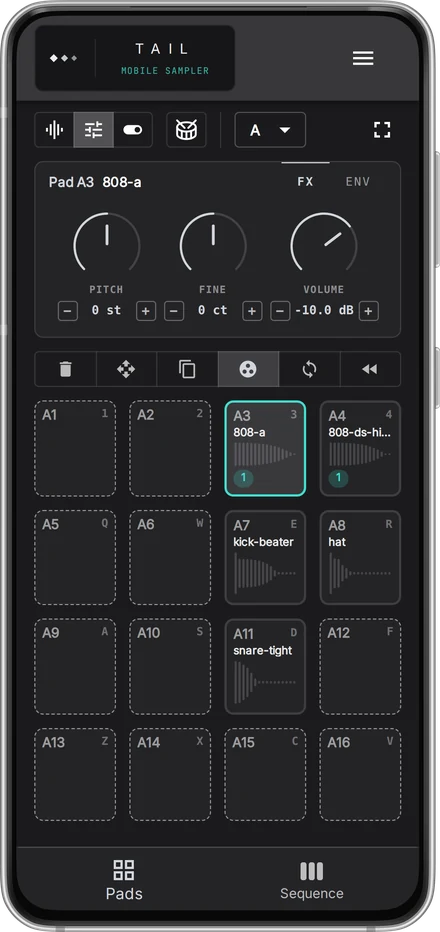
TAIL — Mobile Sampler
Want to make beats on your phone?
Sixteen pads and a step sequencer, sized for a phone.
Try it in the browser