Online Drum Pad
16 MPC-style pads you can play right now — free, in the browser. Click, tap, type, or plug in a MIDI controller.
Loading the pads…
Play the Online Drum Pad Right Now
An online drum pad is a grid of sample-triggering pads that runs in your browser — no app, no install, no account. This one has 16 of them, loaded with a full trap kit and running the same engine as the app itself. Click a pad, or use the 4×4 key grid — 1-4, Q-R, A-F, Z-V. Four 808s sit on the top row, kicks and snares in the middle, hats and percussion at the bottom. Every pad responds instantly: the audio runs in a WebAssembly AudioWorklet, so trigger latency is low enough to actually play, not just program. Fourteen kits sit behind the arrows above the pads — trap, drill, phonk, boom bap, lofi, amapiano, jersey club and more — each one royalty-free and loaded in about a second. Step through them and the same fingers play a different record. When you want the sequencer, swing and export around it, take the kit with you using the link under the pads.
Drum Pad Online with Keyboard, Mouse, Touch or MIDI
1. Mouse / Touchscreen — click or tap any pad. Works on phones, tablets, and desktops, which makes this a drums app online as much as a desktop tool. 2. Computer Keyboard — pads are mapped to a 4×4 key grid: 1 2 3 4 → Pad 1-4 Q W E R → Pad 5-8 A S D F → Pad 9-12 Z X C V → Pad 13-16 Space = stop all 3. MIDI Controller — plug in any USB MIDI controller or pad (Akai MPD, Arturia MiniLab, etc.). Padwolf auto-detects it via Web MIDI. Default mapping: MIDI notes 36-51 (standard MPC). Velocity sensitive. 4. Touch + Keyboard combo — on tablets with a Bluetooth keyboard, you get both tap and key input simultaneously. On the keyboard, keep kicks and snares on the bottom rows under your left hand and hats and percussion up top under your right, like a kit. Two limits to know: keys have no velocity, so program dynamics in the sequencer instead, and most keyboards only register 3-6 keys at once — if a chord of pads drops a hit, that is key rollover, not the app.
Load Any Sound onto the Pads
Unlike preset-only drum pads, Padwolf lets you load your own samples. Drag audio files from your computer (MP3, WAV, FLAC, OGG) onto any pad. Use any sound as a drum pad: • Drum kit samples (kick, snare, hi-hat) • Vocal chops and ad-libs • Instrument one-shots (piano chords, guitar stabs) • Sound effects (risers, impacts, transitions) • Recorded samples (record something, drag it in) 16 pads × unlimited sounds = infinite possibilities.
Shape Each Pad
Every pad has independent controls: • Pitch — shift up or down by semitones and fine cents. Load one hi-hat and create different tones on different pads. • Volume — adjust in dB. Balance your kit without external mixing. • Trim — set start and end points on the waveform. Tight samples trigger cleaner. • Loop — toggle to make a sound repeat continuously when triggered. • Mute Groups — assign pads to choke groups. When one pad plays, it silences others in the same group. Essential for open/closed hi-hat realism.
Electronic Drum Set Pads Online
Two different things get called a drum pad, and it is worth knowing which one you want. An electronic drum set pad is a rubber trigger pad you hit with sticks — part of a Roland or Alesis kit, wired to a sound module. It plays drum-kit sounds and nothing else. What you have above is the studio kind: an MPC-style sample pad, where each of the 16 squares holds any sound you give it. The studio kind does the drum-set job too. Load a kick, snare, closed hat, open hat, ride, crash and two toms across eight pads and you have an electronic drum set online, played with fingers or keys instead of sticks. Put the closed and open hat in the same mute group and they choke each other exactly like a real hi-hat pedal. The remaining eight pads are then free for percussion, 808s or vocal chops — which is the part a hardware drum-set pad cannot do.
Using It as a DJ Drum Pad
Pads are not only for building a kit one hit at a time. Load full loops, risers, sirens, air horns and vocal stabs, and the grid turns into a DJ drum pad you trigger over whatever else is playing. Three settings do most of the work here. Loop makes a pad repeat for as long as you want it running, so a two-bar loop can sit under everything else. Mute groups mean two loops can never overlap — put all your loops in one group and each new trigger cuts the previous one, which is how you switch cleanly instead of stacking mush. Trim tightens the start of each sample so it drops on the beat rather than a moment after it. Everything runs locally in the tab, so there is no upload step and no latency from a server round trip.
Drum Pad Game or Real Drum Pad?
Search for a drum pad game and you mostly find tile-tapping apps: notes scroll down the screen, you tap in time, you get a score. They are rhythm games wearing drum-pad clothing — the pads play a fixed song and you cannot change what any of them does. This is the other thing. Nothing scrolls, nothing scores you, and there is no correct answer. You decide what each of the 16 pads holds and what you play with them. That is less immediately gratifying and considerably more useful: the same skill transfers to hardware, and what you play can be sequenced, recorded and exported. If you want the game feel, the closest thing is finger drumming practice — learn one pattern, loop it, play along until it is clean.
From Pads to Patterns
Once your pads are loaded, switch to the Sequencer tab to program patterns. The 16-step grid lets you place each pad on specific beats. But you don't have to use the sequencer. Padwolf is equally powerful as a live performance tool — finger drum on the pads (or keyboard/MIDI) and just play. Record your performance or jam freely.
Open the full beat makerFrequently Asked Questions
Yes — completely. All 16 pads, your own samples, MIDI input, the sequencer and audio export are available with no payment, no account and no trial period. There is nothing to unlock.
No. The drum pad runs in the browser tab you are reading this in — no install, no plugin, no sign-up. It works on Windows, macOS, Linux, Chromebook, Android and iPhone.
Yes. The 16-pad layout, mute groups, pitch/volume per pad, and step sequencer are directly inspired by MPC workflow. If you've used an MPC, Padwolf will feel familiar instantly.
Nothing — they are two names for the same instrument. A grid of squares, each holding a sound, played with fingers, keys or a MIDI controller. "Beat pad" tends to be used for the sample-triggering kind and "drum pad" for the drum-kit kind, but the hardware and the software are identical.
For practice and casual performance, yes. Trigger latency is under 1ms with Web Audio. For stage performance you'd want a dedicated hardware setup, but for jamming, YouTube streams, or practice sessions, it works great.
Any class-compliant USB MIDI controller works — no drivers needed. Padwolf uses the Web MIDI API built into Chrome, Edge, and Opera. Firefox requires a flag to be enabled. Default note mapping is 36-51 (standard MPC), adjustable in the interface.
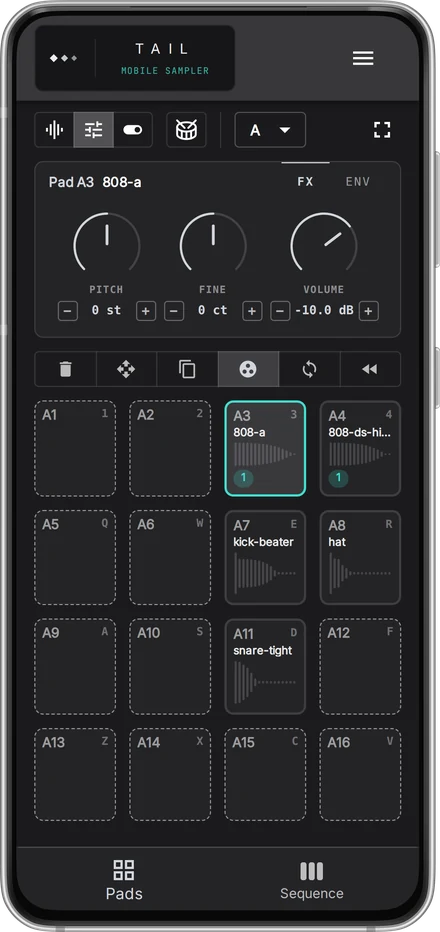
TAIL — Mobile Sampler
Want to make beats on your phone?
Sixteen pads and a step sequencer, sized for a phone.
Try it in the browser